



The dashboard showed that we were closing support tickets faster. Then I looked at the urgent queue. Too many customers were still waiting past the deadline we’d promised them. The average had improved, and I still needed to find out why those customers were waiting.
Average resolution time has a useful place in a support review. Add up the time it took to resolve each ticket and divide by the number of resolved tickets. The result tells you something about the group as a whole. It takes a closer look to see which customers benefited and where delays remain.
How a lower average can hide missed targets
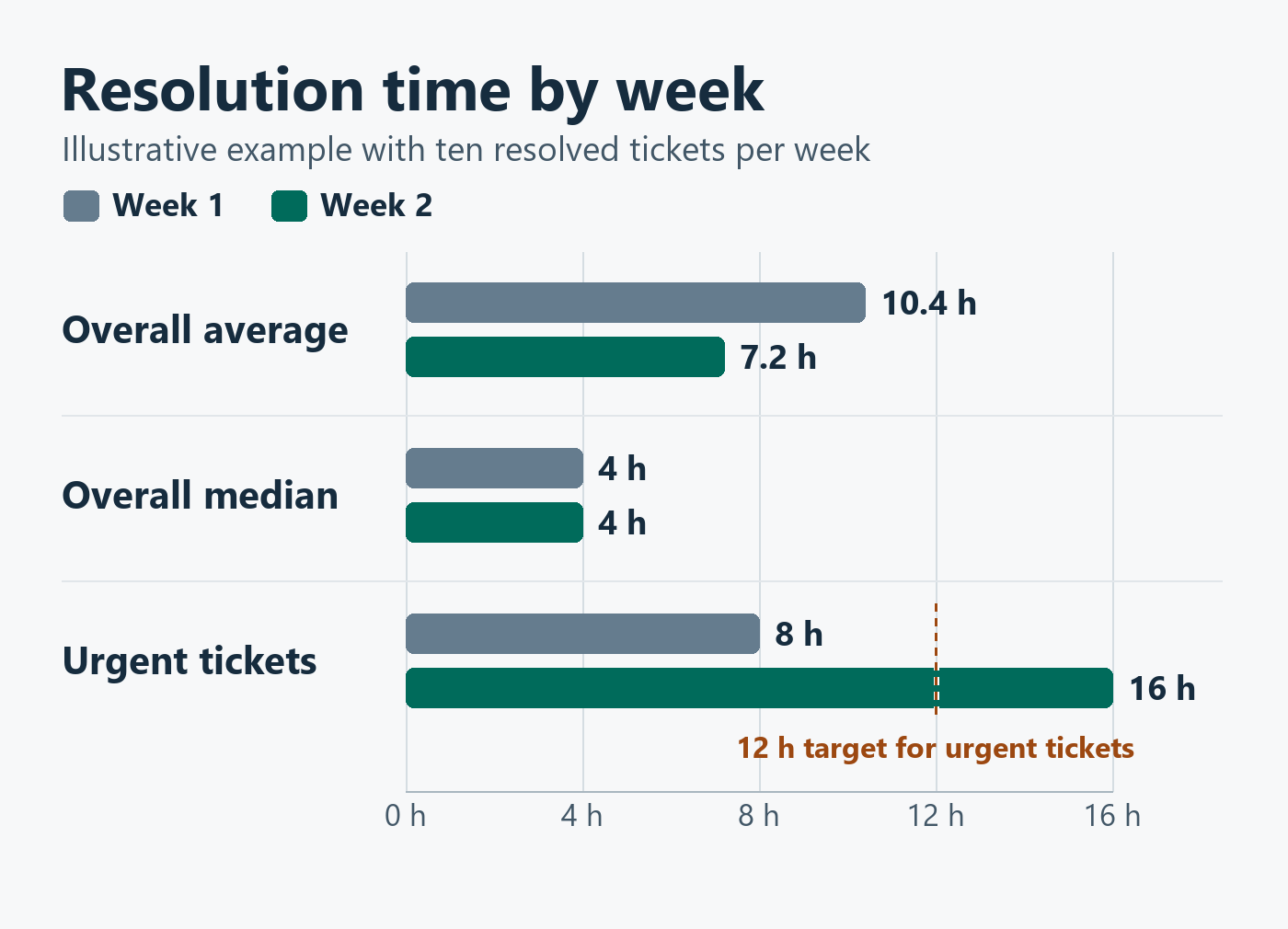
Imagine a team closes ten tickets in each of two weeks. Six routine requests take four hours each in both weeks. Two complex requests improve from 32 hours each to eight. Meanwhile, two urgent tickets go from eight hours each to 16.
The overall average drops from 10.4 to 7.2 hours. The median stays at four hours. If the urgent resolution target is 12 hours, both urgent tickets meet the target in the first week and both miss it in the second. These figures are illustrative. A real improvement in one kind of work can outweigh a worsening experience somewhere else.
What I look at alongside the average
Median and 90th percentile. The median shows how long it took to resolve half the tickets. The 90th percentile shows how long it took to resolve about nine out of ten. Comparing both helps you tell whether improvement reached the slower cases.
Targets met by priority. Review whether urgent, high-priority, and routine cases are meeting their own service commitments. Keep the ticket counts visible so you can tell whether a large swing came from a handful of cases or a broader change.
Open tickets and time waiting. This calculation covers tickets that have reached resolution. Look separately at how long open cases have been waiting, which team or person can move them forward, and when the customer last heard from you.
Keep the clock consistent across reporting periods. If you measure resolution in business hours, use that same definition for each comparison. If priorities or routing rules change, check how they affect the mix of tickets before you draw a conclusion.
What to do when tickets stall
I like to pull up a few of the oldest cases and trace the handoffs. A ticket can spend hours waiting for a technical answer, a decision, or a part. Once you know where the wait started, you can decide whether to change routing, name a backup owner, or agree on a clearer escalation point.
In the next review, check whether that change reduced the wait for the cases it was meant to help. For any case still at risk, leave the meeting knowing who owns the next action and when the customer will hear from them. That’s the follow-through a better average can’t show you.


